Start here
What Bitlevel is, what your eval machine contains, and the five-minute path to a first result.
What Bitlevel is
Bitlevel is Voltai's formal verification product for RTL. You work with it the way you would work with a senior verification engineer: describe what you want in plain language, and the agent scopes the problem, writes the checkers, picks and runs the engines, and hands back results, waveforms and debug notes as ordinary files in your repository.
Two things sit behind the conversation:
- Bitlevel Agents carry the methodology — how to scope a testplan, how to write properties that hold up, how to attack a proof that will not close, how to tell a real failure from an environment artifact. They run inside Claude Code, so the whole session is a terminal.
- Engines are the solver binaries: SMT/SAT bounded model checking, k-induction, IC3, rarity simulation, and Voltai's proprietary agentic bug-hunting (ABH). The agent selects, launches, monitors and interprets them. You can override any choice, but you should not have to.
Everything the agent produces — testplans, SVA, constraint files, run scripts, waveforms — lands in the repo as diffable, reviewable, re-runnable files. If you disagree with a decision, edit the artifact and re-run, or just say so in chat.
Built for designers
Bitlevel is shaped around the RTL designer who wants to catch bugs early, on their own, while bringing up a block — without waiting for DV or FV to get involved. DV and FV engineers benefit too: the same agent accelerates the workflows they already run.
What is on your machine
Your instance is a dedicated Ubuntu server, reachable as
your-instance.singularity.voltai.ai. It comes with:
| Tool | What it is for | How you reach it |
|---|---|---|
| Claude Code | The agent. The main way you use Bitlevel. | claude in any terminal |
| bitlevel toolchain | bitlevel-compile / bitlevel-analyze and the engines | on PATH, driven by the agent |
| caliptra-demo | Three ready-to-run formal benches over real Caliptra RTL | ~/caliptra-demo |
| tmux | Keep a session alive when your connection drops | tmux |
| code-server | VS Code in the browser — edit RTL, browse results | SSH tunnel → http://localhost:8080 |
| GTKWave / Surfer | Look at counterexample and simulation waveforms | VNC, or ssh -X |
| VNC desktop | A full XFCE desktop when you want windows | SSH tunnel → localhost:5901 |
| Icarus Verilog | Quick directed simulation when formal is the wrong tool | iverilog / vvp |
Only port 22 is open. Everything else is reached through an SSH tunnel, so nothing you start on the box is ever exposed to the internet by accident. Connecting walks through every one of these.
The demo: three real findings in Caliptra
~/caliptra-demo is a self-contained package of three formal benches over the
open-source Caliptra root of
trust — unmodified RTL at commit 1f272de5, plus a wrapper, a bound SVA
checker, a file list and a directives file per bench. Each one reproduces a
hardware finding:
| Bench | Module | What it finds |
|---|---|---|
config_rtl/mbox_arb | mailbox + SoC-interface arbiter | a force-unlock coincident with a lock-acquire read wedges the mailbox with no error; SRAM access collisions; CSR window aliasing |
config_rtl/pv | PCR Vault | a clear coincident with a client write leaves one dword uncleared; a locked PCR is clearable inside the fw-update reset window |
config_rtl/dma_ctrl | AXI DMA controller | the config write-lock lags go by one cycle; the wait-for-data state has no flush escape (a liveness failure) |
Every bench has a REPORT.md explaining its properties and assumptions.
docs/EXPECTED_RESULTS.md holds the expected verdicts — kept separate on
purpose, so you can judge the counterexamples unaided first if you prefer.
Five minutes to a first result
-
Connect. Your Voltai contact gives you a
.pemkey.ssh -i your-key.pem ubuntu@your-instance.singularity.voltai.ai -
Open a session in the demo.
cd ~/caliptra-demo tmux # optional, but survives a dropped connection claude -
Ask it to orient you — a question first, so you can see the shape of an answer grounded in the actual files:
In one paragraph, what does
config_rtl/mbox_arbcheck, and which RTL files and directives does it read?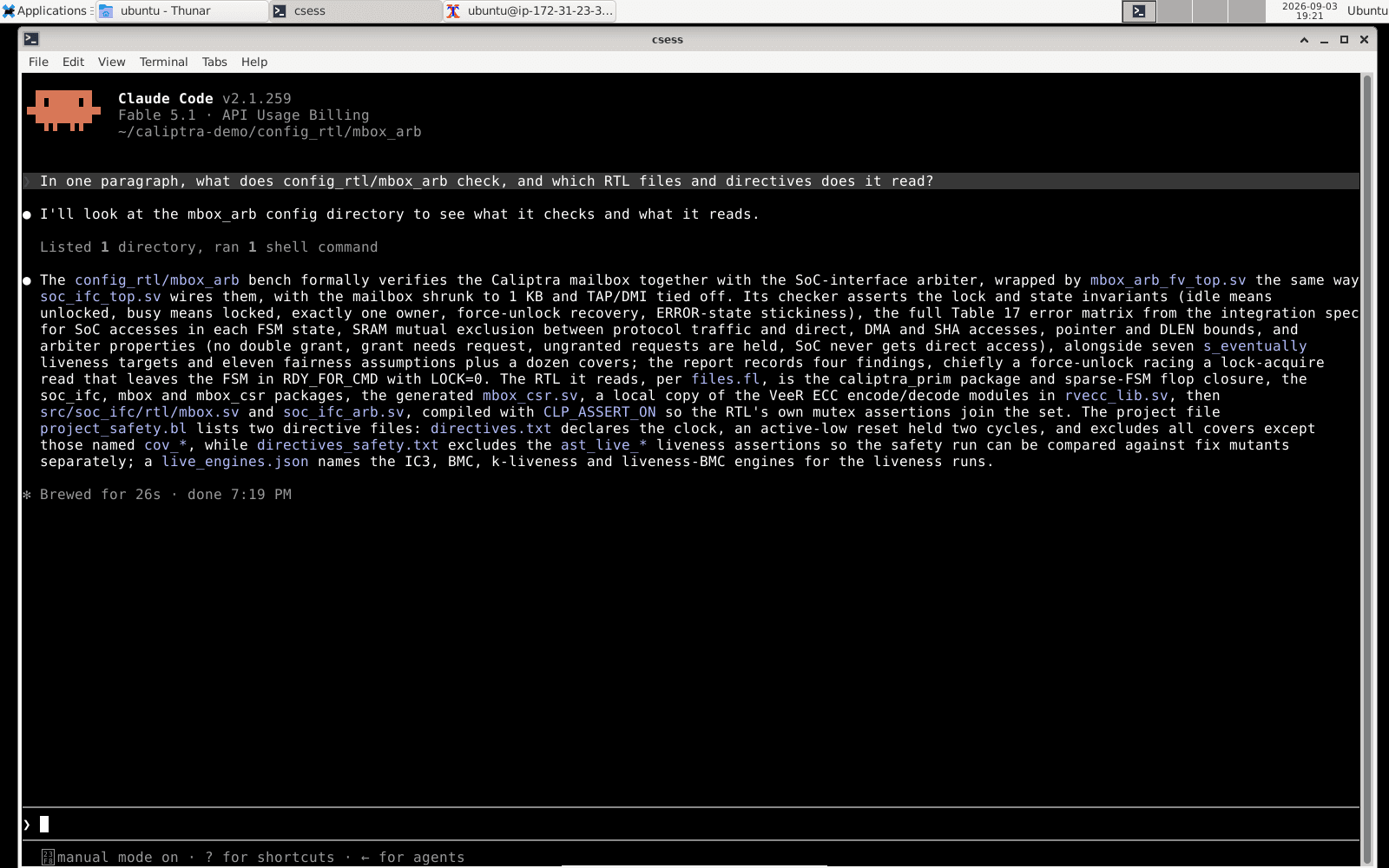
-
Then ask for the run. The mailbox bench takes about eight minutes:
Run the
mbox_arbsafety bench with an 8 minute timeout and 3 workers, then triage everything that fired: real bug, checker bug, or environment artifact?The agent compiles, runs the engines, and comes back with a triaged list — each failure with the depth it was found at and a waveform. Then ask what it makes of the first one:
Explain the first counterexample cycle by cycle. Is the force-unlock race a real hardware bug?
That is the whole loop. The rest of this guide covers how to reach every tool (Connecting), what a session looks like (Your first session), and then the methodology in depth.
A note on the workflows
Bitlevel is a free-flowing product — there is no set way to use it. The workflows in this guide are illustrations of what the agent can do, not prescriptions. Most sessions mix patterns: orient with a testplan, drop into freeform chat to chase a bug, come back to the plan. Talk to it the way you would talk to a colleague.